English-MT
Common Keyboard Shortcuts
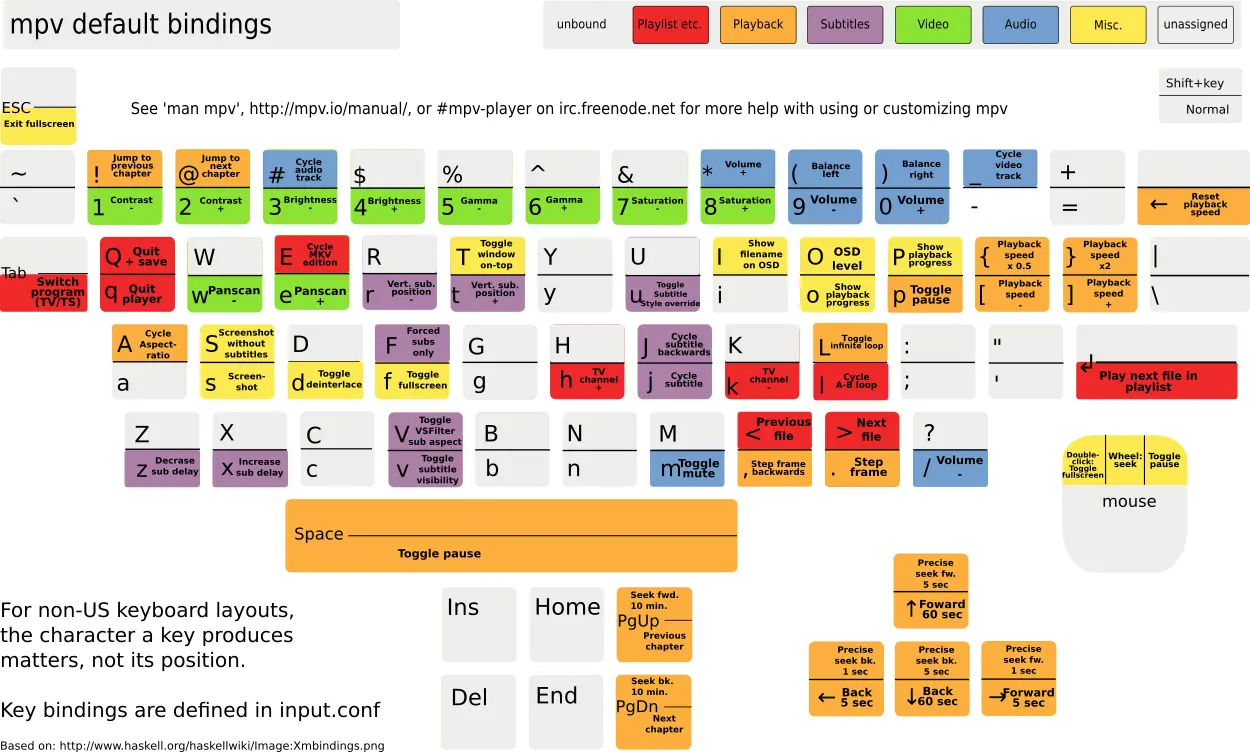
Alt + f— Search subtitlesCtrl + d— Search danmakud— Show/hide danmakuAlt + d— Open the danmaku master toggle menuO— Show/hide OSD messages (top-right information, including playback time and system time)Ctrl + t— Keep the window on topCtrl + -— Zoom outCtrl + +— Zoom ina— Change video aspect ratioe— Open the visual equalizer adjustment paneli— Show statistics (file, decoding, shader/filter information, etc.)l— A-B loop playback (lowercase L)m— Mute]— Increase playback speed[— Decrease playback speedEnter— Enter/exit fullscreen↑— Increase volume↓— Decrease volume→— Seek forward←— Seek backward<— Previous frame>— Next frameMouse wheel button / Space— Pause/playLeft mouse button— Hold and drag in the middle of the video to move the windowCtrl + i— View and configure all shortcuts (mpv.net only)Other shortcuts (some may be overridden by shortcuts in the right-click menu; actual behavior may vary):